Buttons for viewing the simulation
The buttons for viewing the simulation are located in the upper left corner of the Options menu.
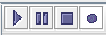
There are 4 buttons in total to view the simulation:
 «Play»: start viewing the simulation.
 «Pause»: pause the simulation view.
 Stop: Stop viewing the simulation.
 Record: Record the simulation on video.
By hovering the cursor over any of these buttons, you can get a hint about its purpose.