Buttons to control the simulation process
Buttons for controlling the simulation process are located at the very top of the simulation settings panel.
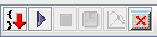
There are a total of 6 buttons to control the simulation process:
 Generates code for the model simulation.
 Start_simulation_process.
 Stop_simulation_process.
 Saves simulation results into the database.
 Opens plot dialog to visualize simulation results.
 Clear log.
By hovering the cursor over any of these buttons, you can get a hint about its purpose.
Note
Immediately after opening the Simulation tab, the buttons , , and will be inactive.