Model simulation parameters editing area (Engine)
When you switch to the Engine tab in the editing area, you can configure the following settings:
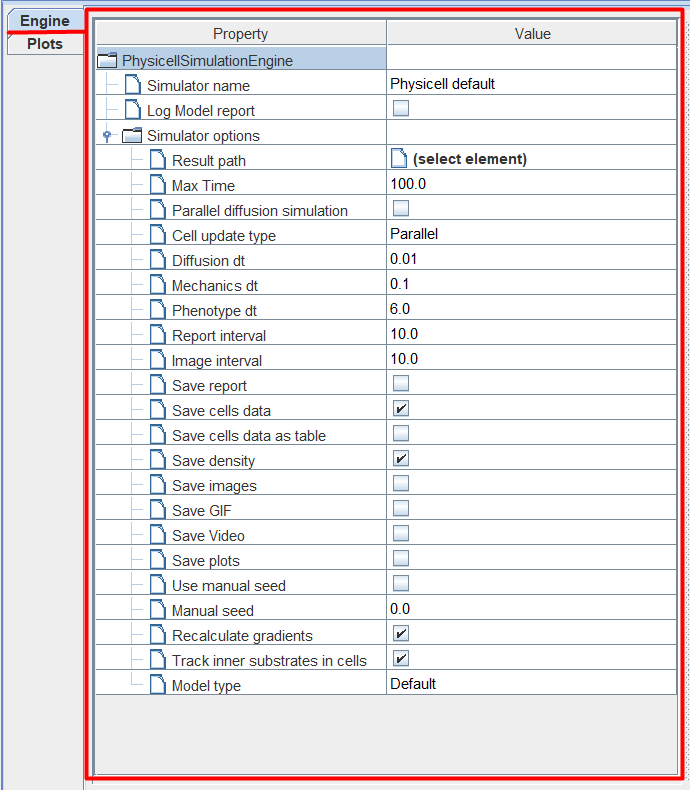
Simulator name: numerical solver,
Log Model report: check ☑ if you want to output model data to the console before starting calculations,
Result path: path in the module repository for saving results,
Max Time: model time until which the simulation will continue,
Parallel diffusion simulation: check ☑ if you want to use parallelization of calculations when modeling the processes of diffusion of substances,
Cell update type: method for calculating the behavior of individual cells,
Diffusion dt: model time step for calculating the diffusion of substances,
Mechanics dt: model time step with which cells interact with each other and with substances in the environment,
Phenotype dt: model time step with which the internal state of cells is updated,
Report interval: model time step with which a tabular report on the state of the model during simulation is displayed,
Image interval: model time step with which the visual display of the model is saved during simulation,
Save report: check ☑ if you want to save tables,
Save cells data: check ☑ if you want to save cell data in text files,
Save cells data as table: check ☑ if you want to save cell data in tables,
Save density: check ☑ if you want to save data about substances,
Save images: check ☑ if you want to save images of the model during the simulation,
Save GIF: check ☑ if you want to save the GIF image of the model during the simulation,
Save Video: check ☑ if you want to save video of the model during the simulation,
Save plots: check ☑ if you want to save,
Use manual seed: check ☑ if you want to use a custom seed for random model processes,
Manual seed: user seed for random processes of the model,
Recalculate gradients: check ☑ if you want to recalculate gradients of substances during model simulation,
Track substrate inners in cells: check ☑ if you want to track the content of substances inside cells during model simulation,
Model type: model type.
Note
To simulate Physicell type diagrams, the properties of the PhysicellSimulationEngine numerical method are always used (not editable).
Next we’ll look at some of the Engine tab options in more detail.