Adding variables for plotting (Plots)
When you switch to the Plots tab in the editing area, you can add the variables that you want to display on the graph. To do this you need:
Click LMB on the line with
 Curves.
Click LMB on the
 icon.
icon.
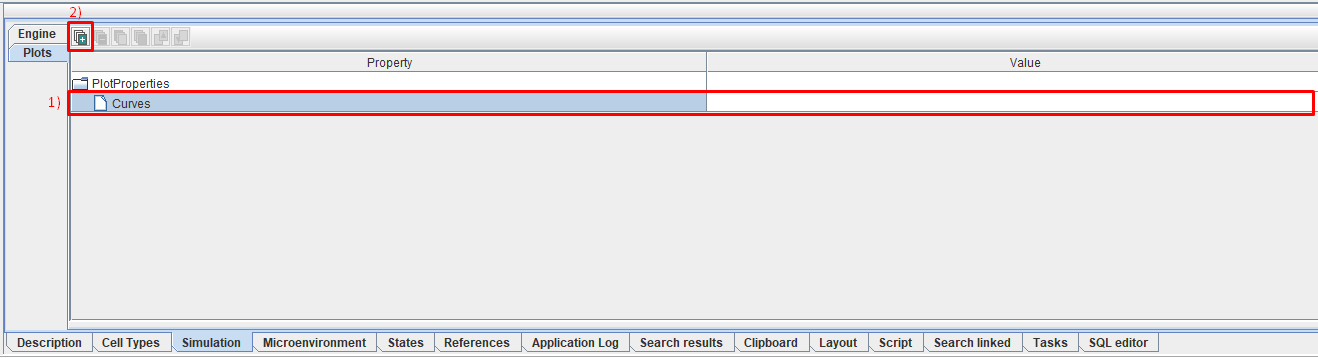
This way you can add as many variables as you like.
After this, a tab will appear with its own sequence number (starting from [0]). In this tab you need to describe the variable that you want to display on the graph. To describe a variable, 5 fields are used in this tab:
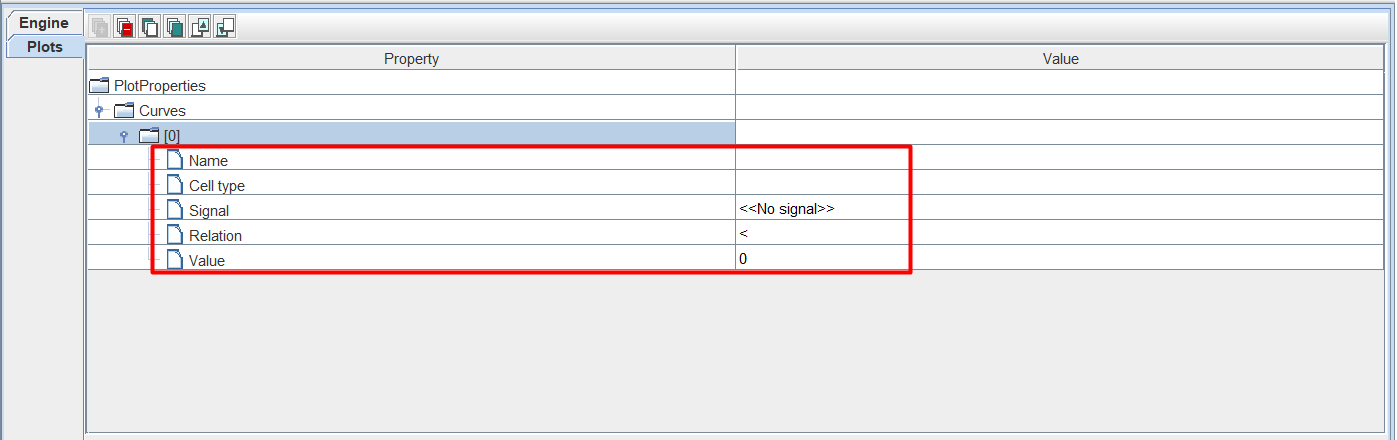
Name: variable name,
Cell types: cell types.
Signal: signal,
Relation: the ratio of the selected cell type to the signal,
Value: signal threshold value.
To set the values of the Cell type, Signal, and Relation fields, you need to click LMB to the right of the corresponding icon and select the desired option from the drop-down list.
Note
First you need to specify the value of the Cell type field, and then - Signal (there will be no value in the drop-down list opposite the Signal field if the Cell type field is not yet filled in).
To set the values of the Name and Value fields, you need to click LMB to the right of the corresponding icon and enter your value.
Let’s look at how a variable description works using these 5 fields using the example below:
Name = Fed_cells,
Cell type = Amoeba,
Signal = Food,
Relation = ">",
Value = 10.

This means that the graph will show the value of the Fed_cells variable (Name),
which corresponds to the number of cells of type Amoeba (Cell type) that have consumed
the substrate named Food (Signal) in an amount greater (Relation) than 10 (Value).
In the drop-down list next to the Cell type field, all cell types in the model are available.
In the drop-down list next to the Signal field, various substrates, reactions, interactions between cells, etc. are available.
The following mathematical symbols are available in the drop-down list opposite the Relation field: “<” (less than), “<=” (less than or equal to), “>=” (greater than or equal to), and “>” (greater than).
To work with existing variables, use this functionality.