Create an event
An event is an instantaneous change in the model as a result of the triggering of a certain condition (for example, the achievement of a given value of model time).
To create an event in the model, you need:
Click LMB on the icon
 on the top toolbar.
Click LMB on any space of the work area.
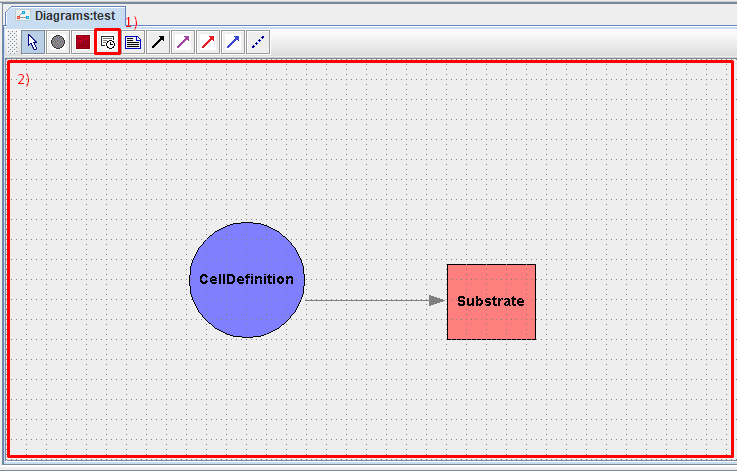
After this, in the window that appears, you need to set the parameters of the event to be created:
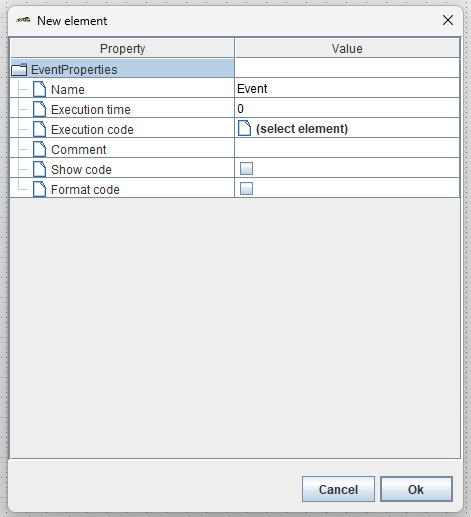
Name: event name.
Execution time: model time, upon reaching which the event is triggered.
Execution code: path to the Java code that is executed when the event is triggered.
Comment: comment,
Show code: select ☑ if you want to show the entire code on the model diagram.
Format code: Select ☑ if you want to format the code shown on the model diagram.
Once all parameters have been set, click Ok.
The event will appear on the screen as a translucent rectangle.
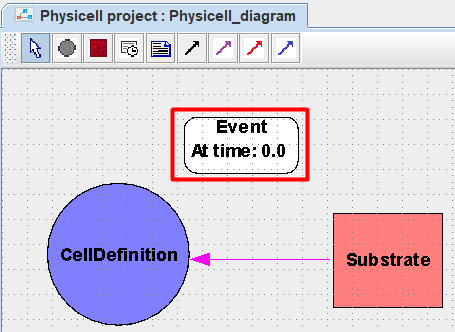
In this way you can create any number of events in the model.
To move an event designation on the diagram, you need to hold down the LMB on this designation, move the cursor to a new location and release the LMB.
To delete an event from the model, you need to click on its designation with LMB, and then press the Delete key.
Если вы работаете в веб-версии BioUML, то для удаления нужно:
Нажать на обозначение события ПКМ.
В раскрывающемся списке нажать ЛКМ на Remove
 .
.