Creation of secretion/consumption
During secretion, the cell releases the substrate into the environment, and during consumption, it absorbs it from the environment.
To create a secretion/consumption, you need:
Click LMB on the icon
 on the toolbar.
Click LMB on the cell type that will secrete/absorb a specific substrate.
Click LMB on the substrate that cells of the selected type will secrete/consume.
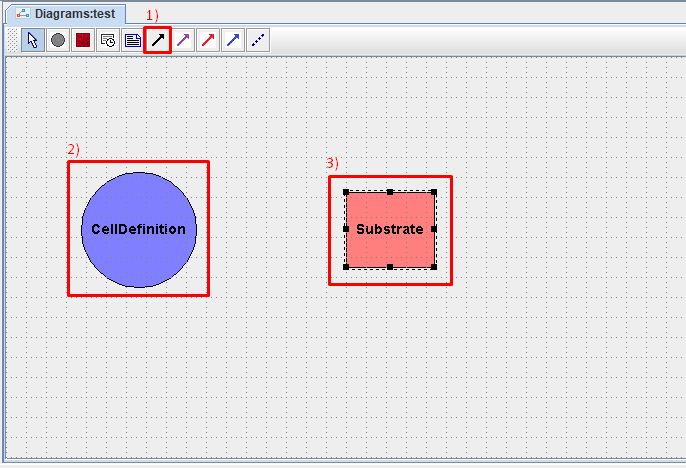
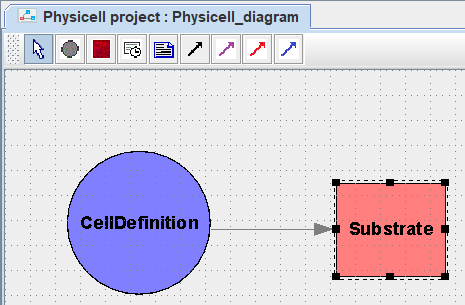
After this, a gray arrow will appear on the diagram, directed from the cell type to the substrate.
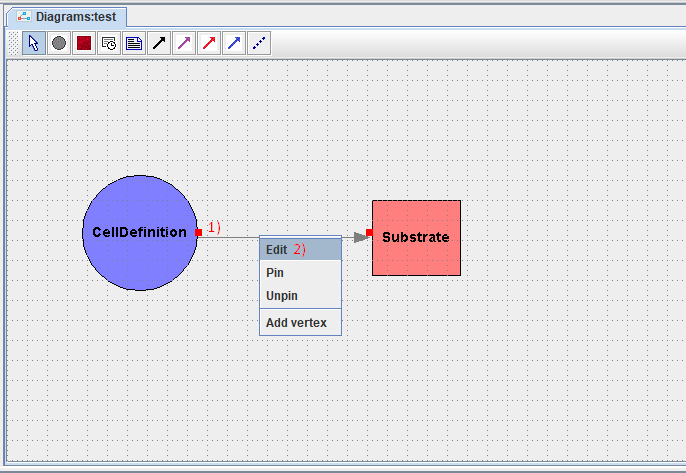
To configure the parameters of the created secretion/consumption, you need to right-click on the arrow on the diagram indicating this secretion/consumption, and in the drop-down list, click LMB on the Edit button.
After this, in the window that appears, you need to set the parameters of the secretion/consumption:
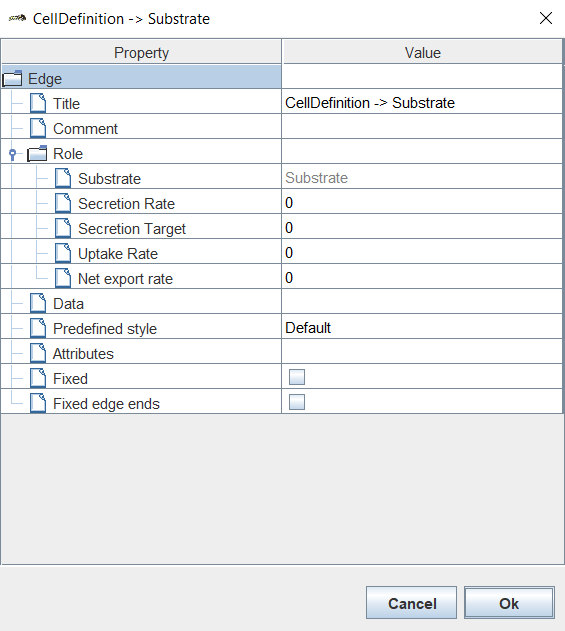
Title: name of secretion/consumption,
Comment: comment,
Substrate: name of the allocated/consumed substrate (unchangeable!),
Secretiom Rate: rate of secretion of a substance,
Secretiom Target: “saturation” value at which secretion stops,
Uptake Rate: rate of consumption of the substance,
Net export rate: constant level of secretion/consumption of substrate, independent of cell volume.
Warning
Positive values of the Net export rate parameter correspond to constant secretion, and negative values correspond to constant consumption.
Once all parameters have been set, click Ok.
Below is the formula for calculating the change in substrate concentration (p) in a three-dimensional lattice cell by one cell per unit time dt:
Where:
D - Diffusion dt from settings simulation,
Vcell - cell volume,
S - secretion rate of the substance (Secretion Rate),
T - “saturation” value at which secretion stops (Secretiom Target),
U - rate of consumption of the substance (Uptake Rate),
E - constant level of secretion/consumption of substrate, independent of cell volume (Net export rate).
In cases where all secretion/consumption parameters, except Net export rate (S, T, and U), have zero values, the formula can be simplified to the following form:
Чтобы удалить секрецию/потребление из модели, необходимо нажать на него ЛКМ и нажать клавишу Delete.
Если вы работаете в веб-версии BioUML, то для удаления нужно:
Нажать на обозначение секреции/потребления ПКМ.
В раскрывающемся списке нажать ЛКМ на Remove
 .
.