Substrate creation
To create a substrate, you need to click LMB on  in the top panel, and then click LMB anywhere under the toolbar.
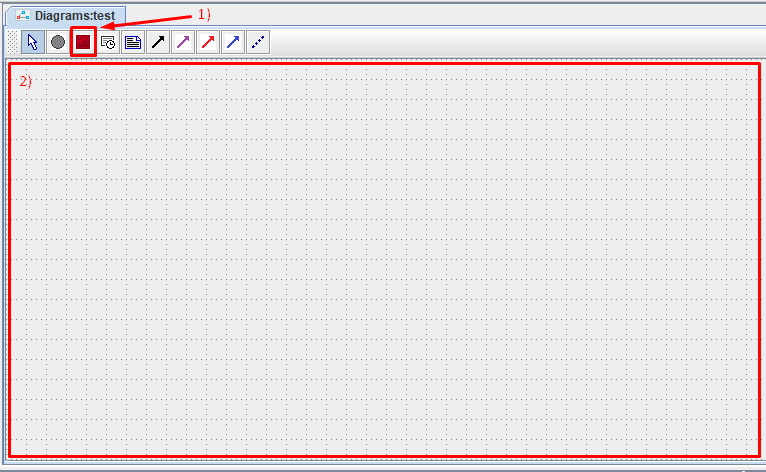
After this, in the window that appears, you need to set the parameters of the substrate being created:
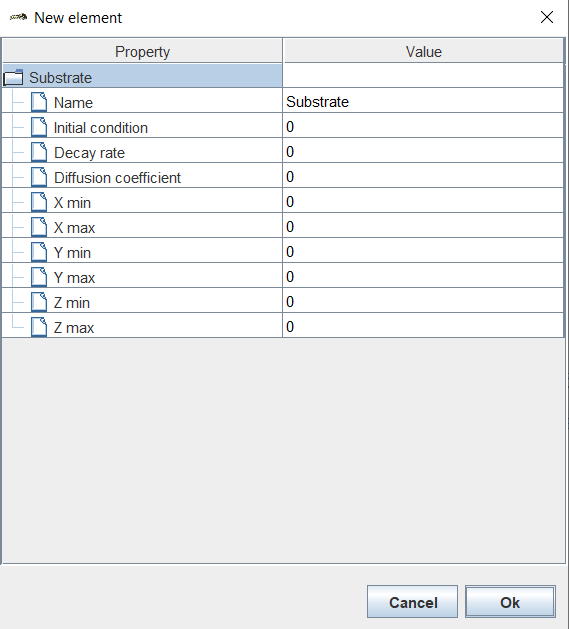
Name: name of the substrate.
Initial condition: initial amount of substrate in each cell of the environment.
Decay rate: rate of decomposition of the substrate in the environment,
Diffusion coefficient: substrate diffusion rate in the environment,
X min: boundary condition for the concentration of the substrate at the boundary of the environment X = Xmin.
X max: boundary condition for the concentration of the substrate at the boundary of the environment X = Xmax.
Y min: boundary condition for the concentration of the substrate at the boundary of the environment Y = Ymin.
Y max: boundary condition for the concentration of the substrate at the boundary of the environment Y = Ymax.
Z min: boundary condition for the concentration of the substrate at the boundary of the environment Z = Zmin.
Z max: boundary condition for the concentration of the substrate at the boundary of the environment Z = Zmax.
Note
The limit value means that at the corresponding boundary of the environment the specified concentration value is constantly maintained.
To disable the corresponding boundary condition, set the value to -1.
Once all parameters have been set, click Ok.
On the screen you will see the designation of the substrate you created.
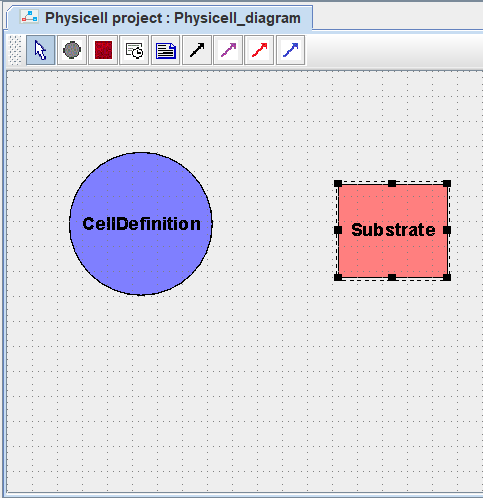
In this way you can create any number of substrates in the model.
To move a substrate on the diagram, you need to hold the LMB on the substrate, move the cursor to a new location and release the LMB.
To remove a substrate from the model, you need to click on it with LMB and press the Delete key.
Если вы работаете в веб-версии BioUML, то для удаления нужно:
Нажать на обозначение субстрата ПКМ.
В раскрывающемся списке нажать ЛКМ на Remove
 .
.
To edit an already created substrate type, you need to:
Right-click on the designation of the corresponding substrate on the diagram.
In the drop-down list, click LMB on the Edit button.
Change the desired properties.
Click Ok.